Shared Family Calendar for School Pickups: How to Prevent Missed Handoffs
Prevent the 3:15 PM 'I thought you were picking him up!' scramble. Learn how to assign primary drivers, backup adults, and explicit pickup handoffs.
Short Answer
Few parenting moments are more stressful than getting a call at 3:20 PM asking why nobody is at the school gate—because you thought your partner or co-parent was driving, and they thought you were. Standard work calendars often fail families here because *putting an event on a shared calendar ("Soccer Practice 4:00 PM") only records where the child needs to be, not which adult owns the pickup, drop-off, and gear prep***.
To prevent missed pickup assumptions immediately—even with a basic calendar or paper planner—adopt five operational rules:
- Never save a kid event without an explicit Driver / Pickup Owner name (e.g.,
[Nora Pickup] Theo Soccer @ North Field). - Assign a named Backup Adult for days when work meetings or traffic could run late.
- Treat every pickup change as a "Two-Way Handshake" (
Pending → Accepted)—sending a text or editing a calendar invite does not transfer responsibility until the other adult explicitly confirms. - Attach the "Bring-With-You" prep item directly to the event (shin guards, water bottle, signed form) so the driver isn't scrambling at the door.
- Audit overlapping windows on Sunday evening by checking transit buffer times between siblings’ schools and fields, not just event start times.
Why Families Encounter This Problem
Standard digital calendars (Google, Apple, Outlook) were built for office meetings, not family logistics. When both parents are on "Pip Preschool Pickup 3:30 PM," shared visibility can create diffused responsibility: seeing the event on both phones makes each parent assume the other has it covered.
Three friction points show up repeatedly in busy households:
- The "Silent Calendar Edit" Trap: Parent A has a late work call added at 2:00 PM and edits the calendar invite while Parent B is in a meeting. Without an explicit Pending Acceptance state, the handoff falls through the cracks.
- Hidden Transit Overlaps: Child 1’s dismissal is at 3:15 PM on the east side of town, and Child 2’s swim lesson ends at 3:30 PM twenty minutes away.
- Co-Parenting & Grandparent Scope: When a co-parent or grandparent helps with Thursday pickups, they need clear visibility into that child’s pickup time and location without seeing unrelated private adult appointments.
Realistic Household Example
Household: Two working parents (Nora and Dev), a connected co-parent (Marcus, sharing school runs for 8-year-old Theo), and Grandmother Rosa helping with 4-year-old Pip on Thursdays.
- The Thursday 4:00 PM Overlap: Theo has soccer practice at 4:00 PM while Pip has preschool pickup at 4:15 PM, and Nora has a clinic shift until 4:30 PM.
- How the family resolves it calmly:
- Every calendar event carries three explicit fields: Participating Child, Assigned Driver, and Prep Checklist (Shin guards + filled water bottle).
- When Nora’s shift overlaps with Theo’s 4:00 PM drop-off, the conflict detector flags the overlap on both the Week view and Daily Compass.
- Nora taps Request Pickup Handoff to Dev (or Marcus for Theo’s shared schedule). Until Dev taps Accept, the handoff remains visibly marked Pending Confirmation.
Practical Step-by-Step Solution Requiring No App
Implement an Explicit Handoff Protocol in 15 minutes using any calendar or wall planner:
- Use the
[Driver → Backup] Event @ Locationnaming rule. Write[Dev → Backup: Nora] Theo Dentist @ Oak Pediatricso anyone glancing at their lock screen knows who is driving. - Include transit buffer inside the calendar block. If soccer starts at 4:00 PM and is 20 minutes away, start the block at 3:35 PM.
- Establish the "Words = Yes" handoff rule. A pickup swap is only confirmed when the receiving adult replies: "I have [Child] at [Time]." Until then, you still own the pickup.
- Put a 2-item "Door Check" in the event notes (
Bring: Cleats + Blue Water Bottle). - Run a 5-minute Sunday Evening "Driver Check" to confirm Monday–Friday afternoon drivers.
Printable / Copyable Template
Copy this weekly pickup ledger or print a household sheet in our Free No-Login Printable Routine & Caregiver Generator:
WEEKLY PICKUP & HANDOFF LEDGER (Rule: You Own It Until Backup Replies "Confirmed!")

Mon: Child: ________ | Time/Place: ____________ | Driver: ______ | Backup: ______ | Gear: ________
Tue: Child: ________ | Time/Place: ____________ | Driver: ______ | Backup: ______ | Gear: ________
Wed: Child: ________ | Time/Place: ____________ | Driver: ______ | Backup: ______ | Gear: ________
Thu: Child: ________ | Time/Place: ____________ | Driver: ______ | Backup: ______ | Gear: ________
Fri: Child: ________ | Time/Place: ____________ | Driver: ______ | Backup: ______ | Gear: ________
Common Mistakes & What to Do When the Initial Approach Fails
- Mistake 1: Keeping kid transit blocks on only one parent’s personal calendar. All recurring child pickups belong on the shared family layer so a backup adult knows where the field or school gate is.
- Mistake 2: Forgetting school pickup authorization lists. Assigning a grandparent or neighbor as backup driver only works if their name is already on the school’s authorized pickup list.
- Mistake 3: Sharing an entire private adult calendar with a co-parent or sitter. Scope shared views to the relevant child’s schedule and pickup logistics.
- When NOT to use this approach: Never rely on asynchronous app notifications for an urgent same-hour emergency (such as a flat tire 15 minutes before dismissal). Always make a direct phone call immediately.
How JarQuest Can Help
JarQuest’s Calendar and Daily Compass treat pickup ownership and prep items as first-class records:
- Automatic Overlap & Driver Conflict Detection: Flags overlapping pickups and offers a 1-tap backup driver assignment.
- Five Calendar Views (
Agenda,Day,Week,Month,Family Timeline): The Family Timeline swimlane view displays each child and adult side by side across the day. - Event-Linked Preparation Checklists: Attaches checkable gear items directly to the event and today’s routine.
Step-by-Step JarQuest Setup (Interactive Prototype Walkthrough)
Product Status Note: The screenshots below are captured from the functioning JarQuest Sunroom V3.4.1 interactive prototype.
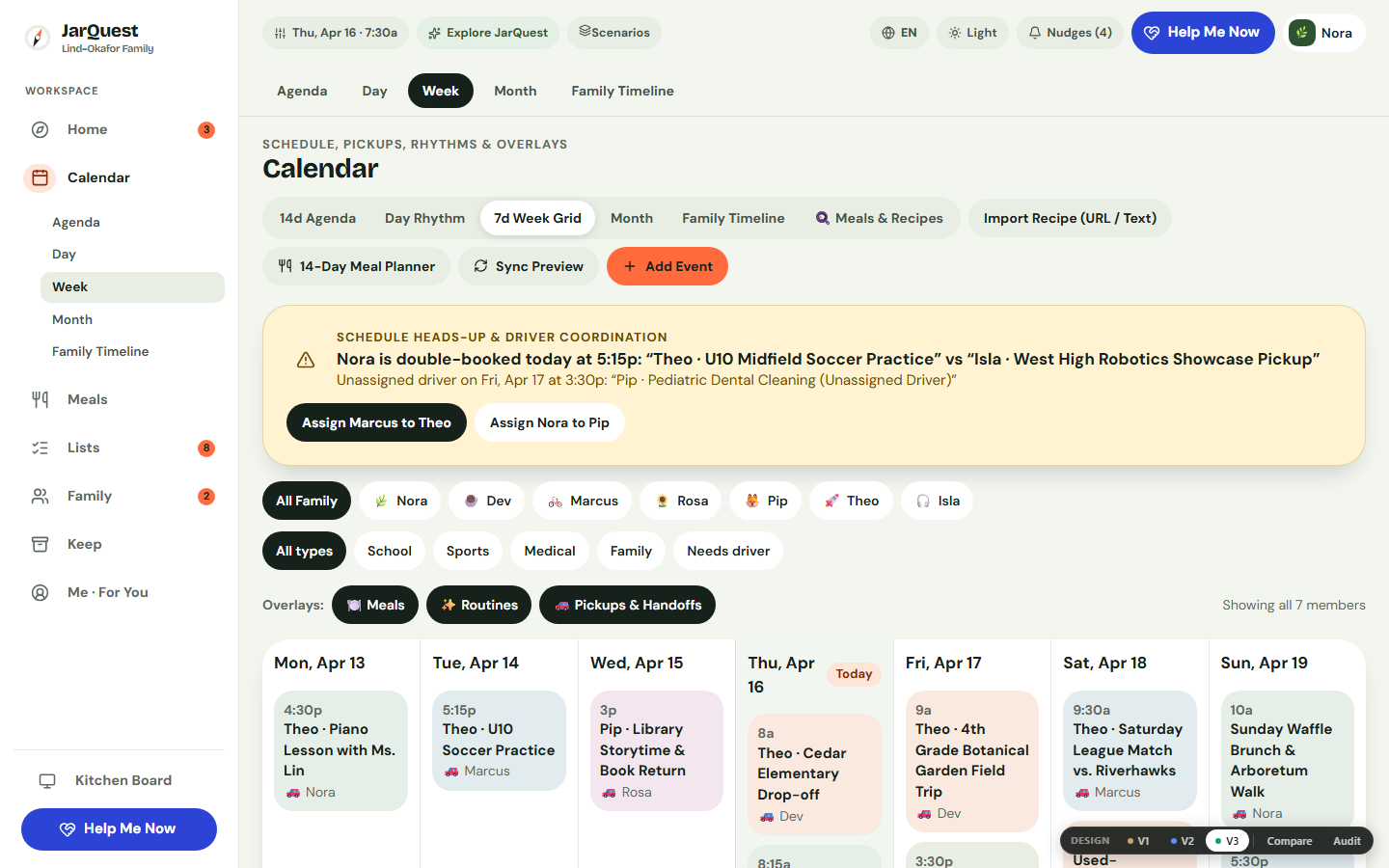
Step 1: Spot Overlapping Pickups and Reassign a Backup Driver in Week View
Open Calendar → Week. When an overlap occurs, the conflict detector highlights the collision at the top of the workspace and lets you assign an available backup adult or send a handoff request.
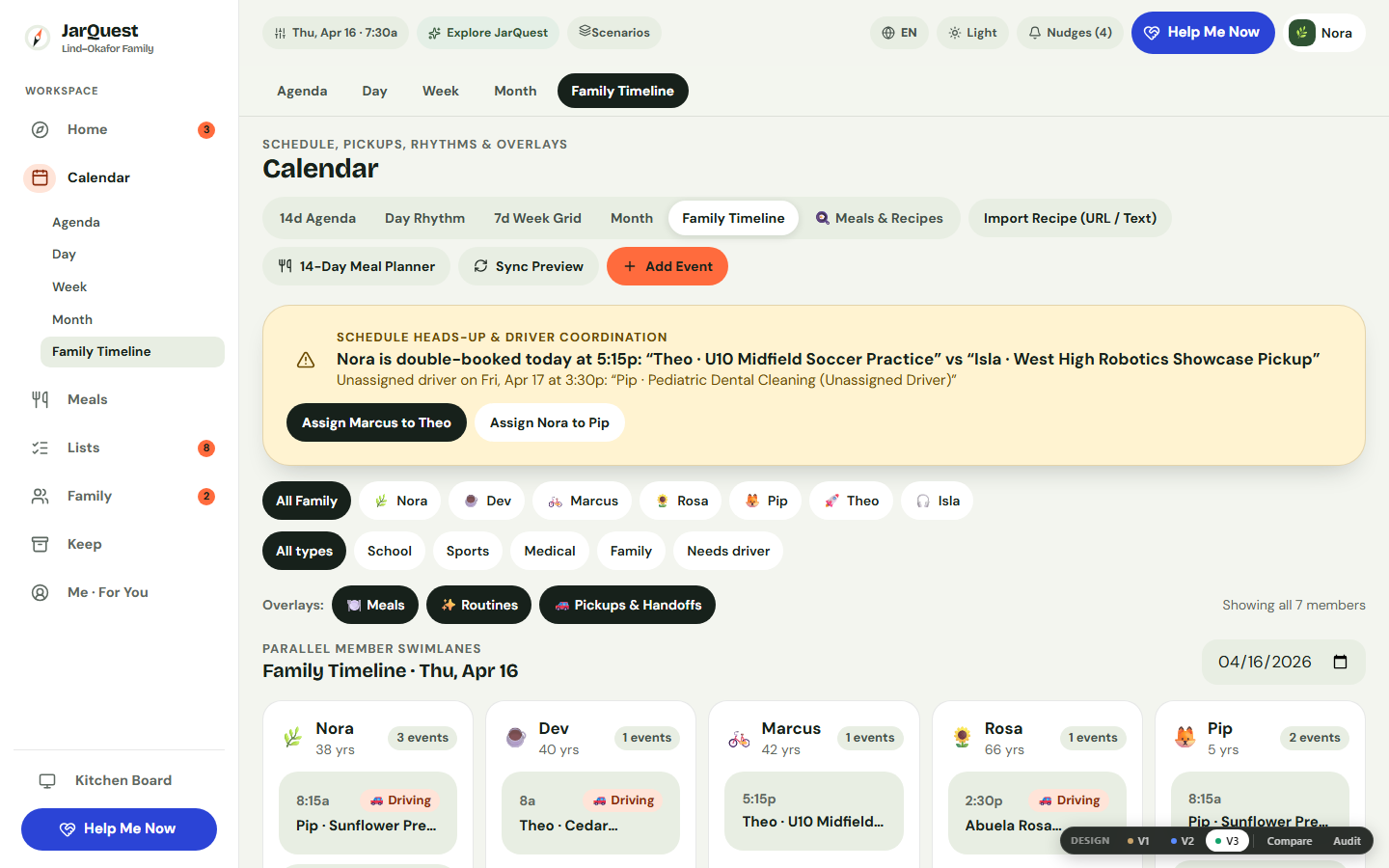
Step 2: Inspect Member Swimlanes in Family Timeline View
Switch to Calendar → Family Timeline to view horizontal swimlanes for every adult and child on the same time axis.
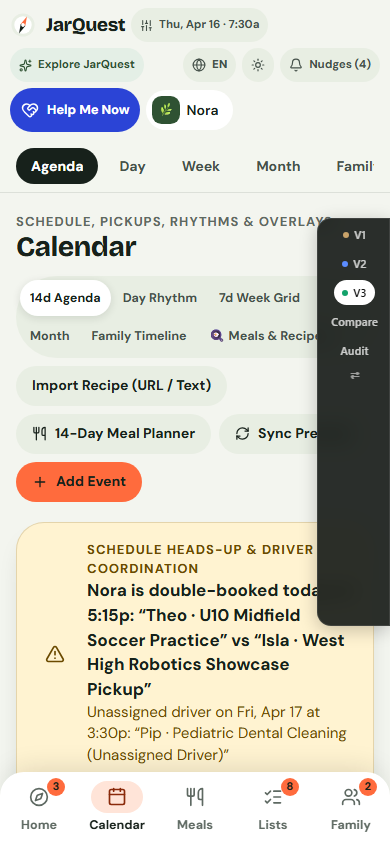
Step 3: Check Driver, Location, and Prep Items on Mobile Agenda
On a phone (390px), open Calendar → Agenda to see chronological cards with the assigned driver, location, and checkable prep items.
Honest Limitations & Planned Features
- What JarQuest reduces: Ambiguous "both parents are on the invite" assumptions, forgotten gear, and undetected sibling schedule overlaps.
- What JarQuest cannot guarantee: Software cannot prevent traffic delays or replace a direct phone call during a last-minute emergency.
- Prototype vs. Production Status: All five calendar views, event creation and editing, driver conflict detection, prep checklists, and child-scoped co-parent visibility are verified in the V3.4.1 prototype. Two-way external iCal/Google sync and real-time multi-device push alerts are part of the upcoming production cloud release.
Frequently Asked Questions
How do we handle school pickups across two co-parenting homes without sharing private calendars?
In JarQuest’s role model, a connected co-parent (Marcus) is scoped to see the events, routines, and pickup handoffs for their shared child (Theo) rather than the primary household’s private adult events or other children’s schedules.
What happens if I request a pickup swap and my partner hasn't accepted yet?
The request stays marked Pending Acceptance and you remain the recorded owner until accepted, reminding you to call directly if departure time is close.
Can children see who is picking them up today?
Yes. In Kid Mode, today’s scheduled events appear in a simple banner at the top of the child’s space so they know who is picking them up.
Related Guides & Contextual Next Step
- Related Guide 1: Co-Parenting Shared Calendar & Custody Handoff Checklist
- Related Guide 2: How to Share the Family Mental Load
- Related Guide 3: Babysitter Instructions and Emergency Home Guide
- Free Printable Utility: Print a Caregiver & Pickup Authorization Sheet
- Explore the Feature: See Shared Family Calendar & Handoffs in JarQuest