Babysitter & Grandparent Home Checklist: Essential Emergency & Routine Guide
Stepping out for the evening? Use this 1-page babysitter and grandparent checklist covering emergency contacts, allergies, where things are, and bedtime rules.
Short Answer
When you are walking out the door at 5:55 PM, a rushed verbal briefing—"The thermometer is in the hall closet, Pip needs her bunny, don't give Theo peanuts, and call the neighbor if needed"—leaves even an experienced sitter or grandparent guessing twenty minutes later. Meanwhile, many printable babysitter sheets online require email sign-ups or store sensitive family details on third-party forms.
A reliable Caregiver & Babysitter Home Brief fits on one single page covering five zones:
- Top Box — Emergency Numbers & Street Address: Exact home street address + nearest cross-street, your local emergency dispatch number (
911in the US/Canada,112across the EU/Bulgaria,999in the UK), parents’ mobile numbers, and one nearby backup adult within 10 minutes. - Health, Allergies & Safety Red Lines: Food/medication allergies, first-aid kit and thermometer locations, and written consent rules before any medication.
- "Where Things Are" in 60 Seconds: Spare pajamas/diapers, flashlights, paper towels, Wi-Fi password, and front door locks.
- Approved Food & Pickup Rules: Safe snacks and authorized pickup adults.
- The 4-Step Bedtime Sequence: Bedtime hour, comfort items, nightlight rules, and wake-up guidance.
Why Families Encounter This Problem
Caregiver handoffs fail when there is either too little written down (causing four texts during dinner) or a 10-page binder of dense prose nobody can scan while a toddler is crying. Three gaps show up repeatedly in household handoffs:
- The Cell-Phone Address Blind Spot: In an emergency, a sitter or visiting grandparent calling local emergency services (
911,112, or999) from a mobile phone can blank on the exact house number or cross-street. Putting the home street address in bold at the very top is the most important line on the page. - "Where Is the..." Friction: Most mid-evening sitter texts ask where spare pajamas, remotes, flashlights, or dog leashes are kept.
- Temporary Caregiver Privacy Boundaries: A babysitter or grandmother using a family tablet needs today’s routines, emergency contacts, and home manual—without seeing a parent’s private mood journal or gift budgets.
Realistic Household Example
Household: Parents Nora and Dev step out Thursday from 5:30 PM to 9:30 PM while Grandmother Rosa (caregiver role) stays with Pip (4) and Theo (8).
- How the handoff works:
- Nora activates Parents Away / Caregiver Mode and leaves a printed one-page brief on the counter.
- Emergency Header: Shows the home address (
42 Sunroom Lane, Apt 3B · Maple & 4th), local emergency dispatch number, parent numbers, Neighbor Elena, and Pediatric Advice Line. - Where Things Are: Lists exact spots (First-Aid Kit: Hallway closet top shelf; Pip's Bunny & Pajamas: Top dresser drawer).
- Scoped Digital Access: Viewing JarQuest as Rosa (
caregiver) allows checking off evening routines and reading the Family Handbook while hiding private adult spaces and gift plans in the interface.
Practical Step-by-Step Solution Requiring No App
- Keep a dry-erase sleeve inside a kitchen cabinet door so permanent facts (address, first-aid spot, Wi-Fi, bedtime steps) stay ready and you only update tonight’s return time.
- Avoid typing real child medical or contact details into untrusted public websites. Use an in-browser local generator or print blank write-in boxes and fill in phone numbers, local emergency dispatch (
911/112/999), and allergies by hand. - Do a 90-second "Point & Touch" physical tour showing three spots: first-aid kit/extinguisher, bedroom & comfort item, and deadbolt/alarm.
- State clear door and pickup rules: "No deliveries expected tonight; only adults listed in Box 1 are authorized for pickup."
- Date every printed copy (
Updated: Month/Year) and refresh twice a year.
Printable / Copyable Template
Open our Free No-Login Printable Caregiver & Routine Sheet Generator to print a formatted A4 or US Letter Babysitter Brief (zero sign-up, blank write-in contact boxes), or copy the checklist below:
BABYSITTER & CAREGIVER HOME BRIEF (Updated: ____/____/2026)
1. EMERGENCY CONTACTS (Write by Hand)
Home Address & Cross-Street: _________________________________________
Local Emergency Dispatch (911 US/CA · 112 EU/BG · 999 UK): ___________
Parent 1 & 2 Phones: ______________________ / ________________________
Nearby Backup Neighbor (10 min): _____________________________________

2. ALLERGIES, SAFETY & WHERE THINGS ARE
Known Allergies: _____________________________________________________
First-Aid Kit & Thermometer: _________________________________________
Flashlight / Breaker / Wi-Fi: ________________________________________

3. TONIGHT'S DINNER & 4-STEP BEDTIME RHYTHM
Approved Dinner / Snacks: ____________________________________________
[ ] 1. Toy pick-up & devices on dock   [ ] 2. Pajamas & brush teeth
[ ] 3. Story & comfort item            [ ] 4. Lights dim / nightlight
Common Mistakes & What to Do When the Initial Approach Fails
- Mistake 1: Not stating tonight’s rules with the kids and sitter together before leaving. Spend 60 seconds together: "Grandma Rosa is in charge; tonight is quesadillas, two books, and lights dim at 8:00 PM."
- Mistake 2: Leaving a locked tablet with no way to see bedtime routines. Leave a printed card or use a scoped Caregiver / Wallboard view.
- Mistake 3: Leaving vague medication instructions. Always write exact pediatrician-approved doses and require phone confirmation before giving medication.
- When NOT to use this approach: A household sheet is not a medical device; in any urgent safety or medical situation, call your local emergency dispatch number (
911,112, or999) immediately.
How JarQuest Can Help
JarQuest combines a digital Family Handbook with our standalone No-Login Printable Generator:
- 3-Pane Family Handbook: Organizes 12 home categories (Emergency & Safety, Medical & Allergies, Where Things Are, Routines, School & Pickup, Wi-Fi, Pets) with a persistent Emergency Header.
- Scoped "Caregiver Mode": Shows today’s schedule, routines, and house essentials while hiding private adult journals and gift budgets.
- Free No-Login Printable Tool: Prints a 1-page A4 or US Letter Caregiver Sheet or Morning Chart in English or Bulgarian (
EN / БГ) with zero account or email required.
Step-by-Step JarQuest Setup (Interactive Prototype Walkthrough)
Product Status Note: Figures 1 and 2 are captured from the functioning JarQuest Sunroom V3.4.1 interactive prototype. Figure 3 is captured from our live No-Login Printable Checklist Generator hosted on this site.
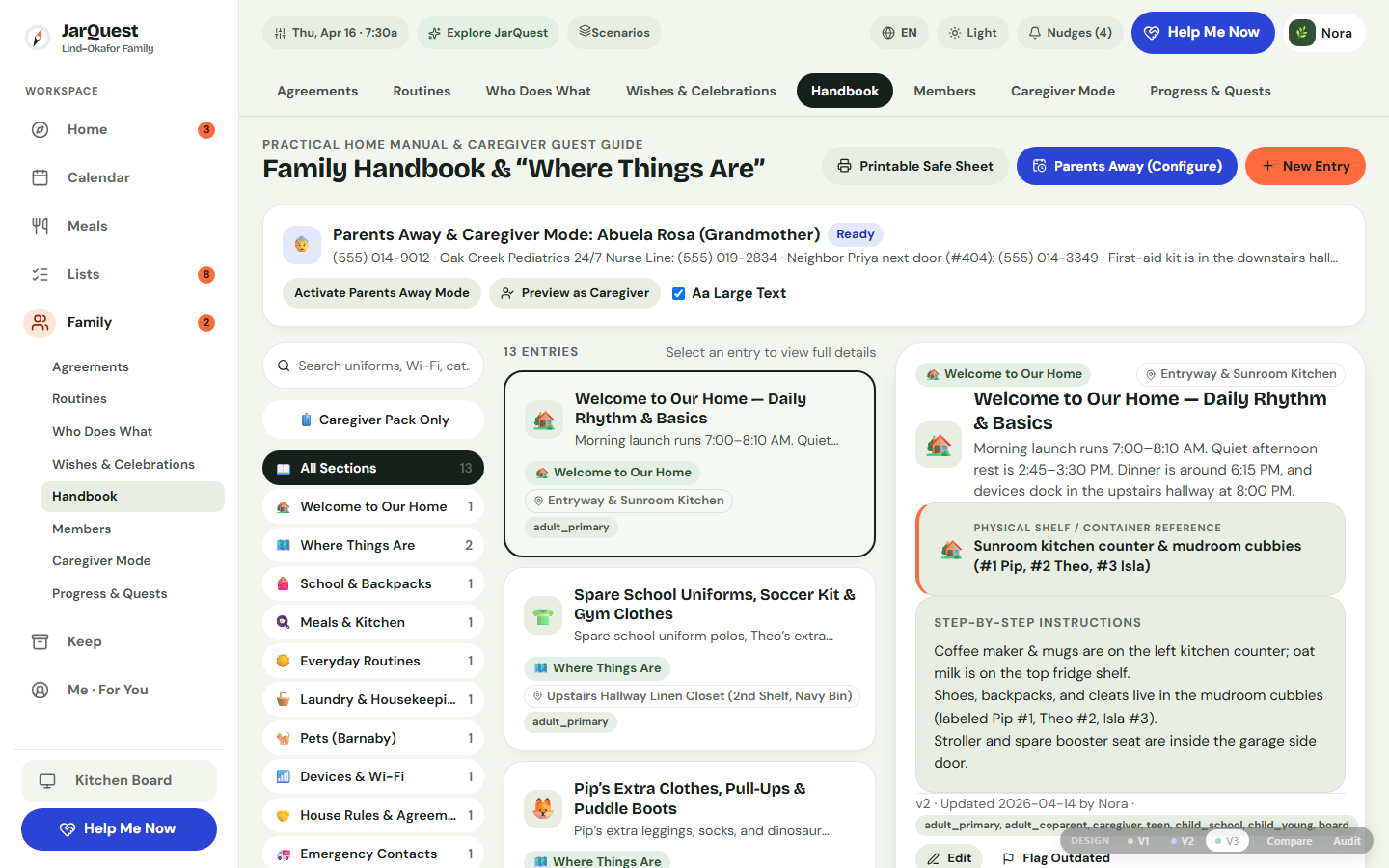
Step 1: Organize House Essentials & "Where Things Are" in the 3-Pane Handbook
Open Family → Handbook. Use the left category rail to filter entries (Emergency, Where Things Are, Routines), scan the middle card list, and view or edit the full instructions in the sticky right-hand detail pane.
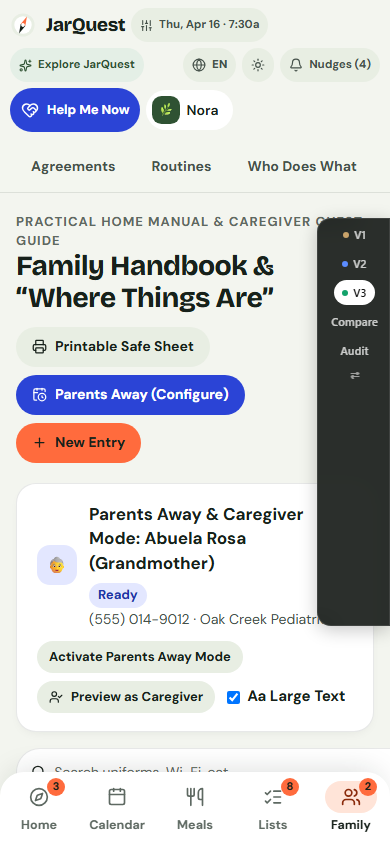
Step 2: Activate "Caregiver Mode" on Mobile When Stepping Out
Switch to Family → Caregiver Mode on a 390px phone or shared tablet. The caregiver sees the active Parents Away banner, authorized emergency contacts, and today’s child routines—without access to private parent check-ins.
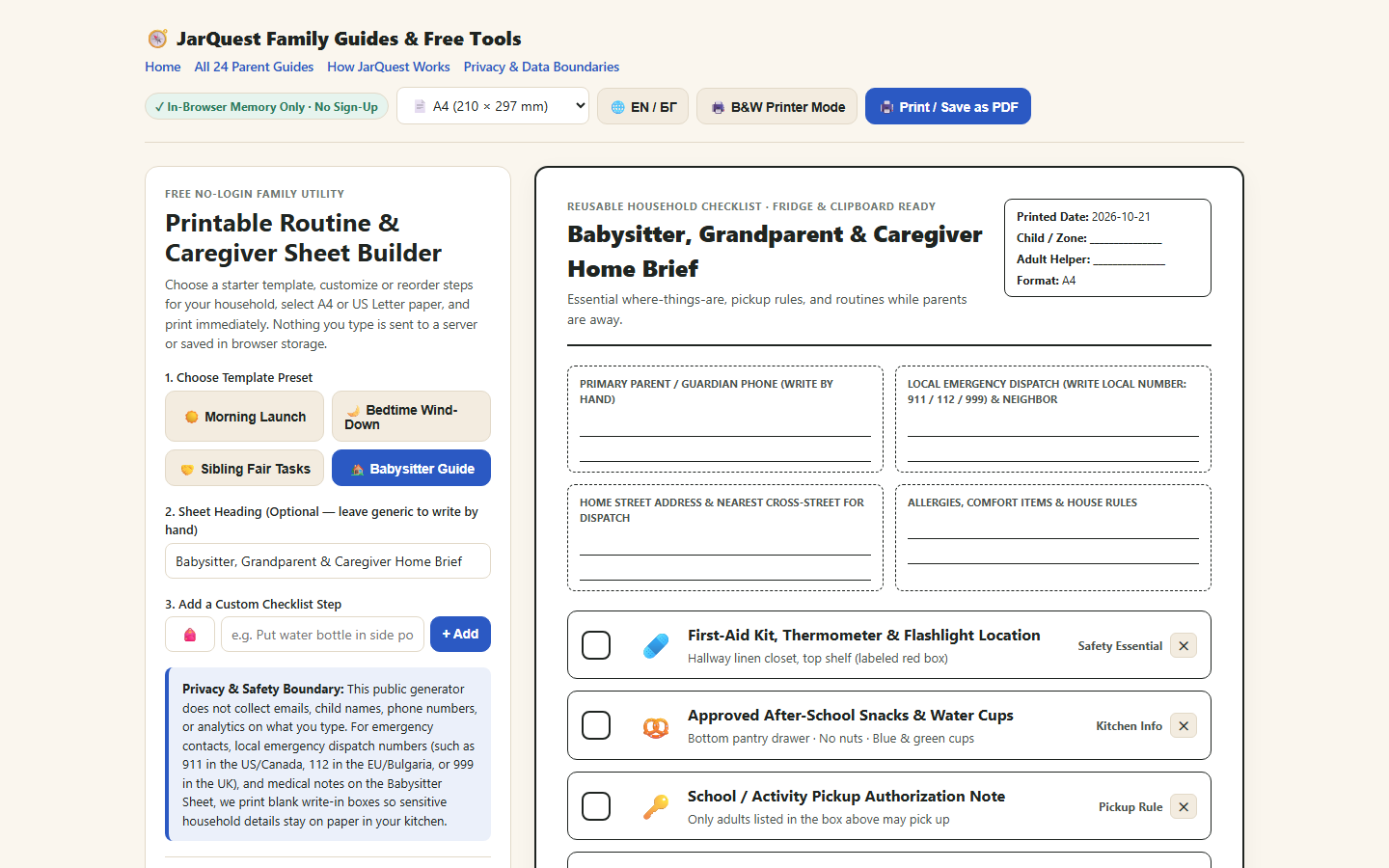
Step 3: Print a Fridge Copy Using the Standalone No-Login Generator
Open our Printable Routine & Caregiver Sheet Builder, select Babysitter Guide, choose A4 or US Letter, toggle B&W Printer Mode or EN / БГ if desired, and click Print / Save as PDF.
Honest Limitations & Planned Features
- What JarQuest reduces: Mid-evening "where is the thermometer?" texts, forgotten comfort items, and accidental exposure of private adult notes on a shared tablet.
- What JarQuest cannot guarantee: Printed sheets go stale if not updated, and neither printouts nor apps replace emergency services (
911,112,999) or direct medical handoffs. - Prototype vs. Production Status: The 12-category Family Handbook, Caregiver Mode UI scoping, and the standalone no-login printable generator work today. Authenticated one-click export of a live household’s redacted caregiver pack with expiry watermarks and server-enforced role tokens is part of the upcoming production cloud release.
Frequently Asked Questions
Why does the public printable generator use blank write-in boxes for emergency numbers and allergies?
Privacy by design. A public no-login tool should not ask parents to type children’s full names, home addresses, or medical details into a web form. Blank write-in boxes let you fill in sensitive details by hand after printing.
How are private parent notes separated when our babysitter uses the family tablet?
In the interactive V3.4.1 prototype, switching to a Caregiver profile or Kitchen Wallboard blocks UI navigation to My Adult Space and Wishes & Celebrations. In the production cloud release, this separation is enforced on the server via role-scoped authentication.
Does the printable generator support Bulgarian as well as English?
Yes. Clicking 🌐 EN / БГ switches presets and headings between English and Bulgarian (Наръчник за баба, дядо и детегледач), and you can select either A4 or US Letter paper formatting.
Related Guides & Contextual Next Step
- Related Guide 1: Grandparent Babysitting Routine Instructions & Checklist
- Related Guide 2: Shared Family Calendar for School Pickups: How to Prevent Missed Handoffs
- Related Guide 3: Sick Child Backup Care Plan for Working Parents
- Free Printable Utility: Launch the No-Login Printable Babysitter & Routine Generator
- Explore the Feature: See the 3-Pane Family Handbook & Caregiver Mode