How to Build a Kids Morning Routine Without Nagging (Ages 4–12)
Stop repeating yourself 15 times before school. Use this 5-step visual morning launch routine, backpack checklist, and calm fallback plan for kids.
Short Answer
If you repeat "Put your shoes on, grab your water bottle, where is your homework folder?" ten times between 7:15 AM and 7:50 AM, the problem is rarely defiance—it is working-memory overload. A child cannot hold a five-part verbal sequence in their head while walking past toys, pets, and siblings.
To stop acting as the human alarm clock tomorrow morning, make five immediate shifts—none of which require buying software:
- Cap the morning sequence at 4 to 5 visible steps (Dressed, Bathroom, Breakfast, Backpack Check, Shoes at the Door).
- Move high-friction decisions to the night before (clothes chosen, backpack in the launch zone, lunchbox in the fridge).
- Break "Pack Backpack" into 3 physical sub-items (Folder, Water Bottle, Library Book/Snack) clipped directly to the bag or hallway wall.
- Point to the visual list instead of repeating verbal instructions ("What's next on your launch card?").
- Agree on a single "Stuck Signal" so your child can ask for help with a tight zipper or missing sock before frustration turns into a stall.
Why Families Encounter This Problem
Weekday mornings compress two demanding jobs into a 45-minute window: adult logistics (work bags, lunches, traffic checks, daycare drop-offs) and child executive functioning (transitioning from sleep to sequential multi-room tasks).
In parent discussions on r/ParentingTech and r/ADHDparenting, families consistently describe three operational failure modes:
- The Multi-Room Memory Drop: Sending an 8-year-old upstairs to brush teeth, put on socks, and bring down their reading folder often means they forget two items or get absorbed in a LEGO build on the bedroom floor.
- Opaque "Bundle" Steps: Telling a child to "Get ready for school" or "Pack your bag" hides four separate sub-decisions. When a child checks off "Pack bag" while forgetting their water bottle, parents feel forced to inspect and redo the whole job anyway.
- Escalating Verbal Prompts: Each time a parent repeats a reminder, their voice tightens because the departure clock is ticking. The child tunes out the background stream of words until the parent raises their voice.
Realistic Household Example
Household: Working parents, an 8-year-old (Theo, 3rd grade) who gets distracted mid-task, and a 4-year-old (Pip, preschool) who needs help with buttons and shoes. Departure deadline: 7:50 AM sharp.
- Before: At 7:35 AM, the parent is packing lunches while calling out reminders. Theo is in one sock reading a comic; Pip wants a different bowl. At 7:48 AM, Theo’s folder is still on the table and his water bottle is empty.
- After a structured launch:
- 7:15–7:30 AM: Both kids follow a 4-step kitchen card using clothes brought downstairs the night before.
- 7:30–7:40 AM: Theo checks the 3 nested items on his backpack card (Folder, Water Bottle, Jacket). Pip taps picture icons (Teeth, Pajamas, Shoes) with one adult helper.
- 7:42 AM: A 5-minute departure chime sounds; bags are already at the door.
Practical Step-by-Step Solution Requiring No App
Set up a durable morning routine tonight using index cards or our free printable sheet:
- Audit departure time backward. Subtract 10 minutes from your car-door deadline (
7:50 AM→7:40 AM) as a shoes-and-coat buffer. - Create a downstairs "Launch Zone." Bring today’s outfit down the night before and keep spare socks and a hairbrush on the main floor.
- Write 3 to 5 age-calibrated steps:
- Ages 4–6: Large picture icons + 2–3 words (Dressed, Teeth, Breakfast, Shoes).
- Ages 7–10: Add a 3-item backpack check (Folder, Water Bottle, Lunchbox).
- Ages 11–14: Autonomous checklist (Alarm, Hygiene, Lunch Grab, Keys & Charged Device).
- Rehearse once on a weekend afternoon when nobody is rushing.
- Replace nagging with one neutral question: "What is the next step on your morning card?"
- Review timing after five school days. Move any step that consistently stalls (like matching socks) to the evening before.
Printable / Copyable Template
Copy this checklist or open our Free No-Login Printable Routine & Caregiver Sheet Generator to print a full A4 or US Letter visual chart without entering an email address:
WEEKDAY MORNING LAUNCH CARD (Target Door Time: ____:____ AM)
[ ] 1. Get Dressed (clothes chosen last night; pajamas in basket)
[ ] 2. Bathroom Reset (brush teeth 2 min + wash face)
[ ] 3. Breakfast & Plate to Sink (protein + water/milk)
[ ] 4. Backpack 3-Item Check:
       [ ] Homework / take-home folder inside bag
       [ ] Filled water bottle in side pocket
       [ ] Lunchbox / snack packed
[ ] 5. Launch Pad (shoes on + jacket at front door 5 min early)
Common Mistakes & What to Do When the Initial Approach Fails
- Mistake 1: Putting 10+ chores onto a school morning chart. Morning launch is for getting out the door calmly, not cleaning bedrooms or practicing piano.
- Mistake 2: Using a high-stimulation game app at 7:25 AM. Heavily gamified apps can tempt kids to stall customizing avatars while their toast gets cold. Keep morning views low-stimulation and one-step-at-a-time.
- Mistake 3: Treating a rough morning as a failure. When a child slept poorly, drop to the Bare Minimum Two: Get dressed + Eat breakfast while the adult packs the bag.
- When NOT to use this approach: Do not rely on a self-guided checklist when a child is acutely ill, experiencing severe school-refusal distress, or under age 3. Direct adult comfort and support come first.
How JarQuest Can Help
When a paper chart on the fridge works, keep using it. Families look for JarQuest when they need:
- Nested checkable backpack substeps so a child checks Folder, Water Bottle, and Library Book individually rather than tapping a vague "Pack Bag" box.
- Shared parent and co-parent visibility so both adults see morning readiness without texting back and forth.
- One-tap "Help Me Now" support when a child waves for help or refuses a morning step.
Step-by-Step JarQuest Setup (Interactive Prototype Walkthrough)
Product Status Note: The screenshots below are captured from the functioning JarQuest Sunroom V3.4.1 interactive prototype prior to production cloud launch.
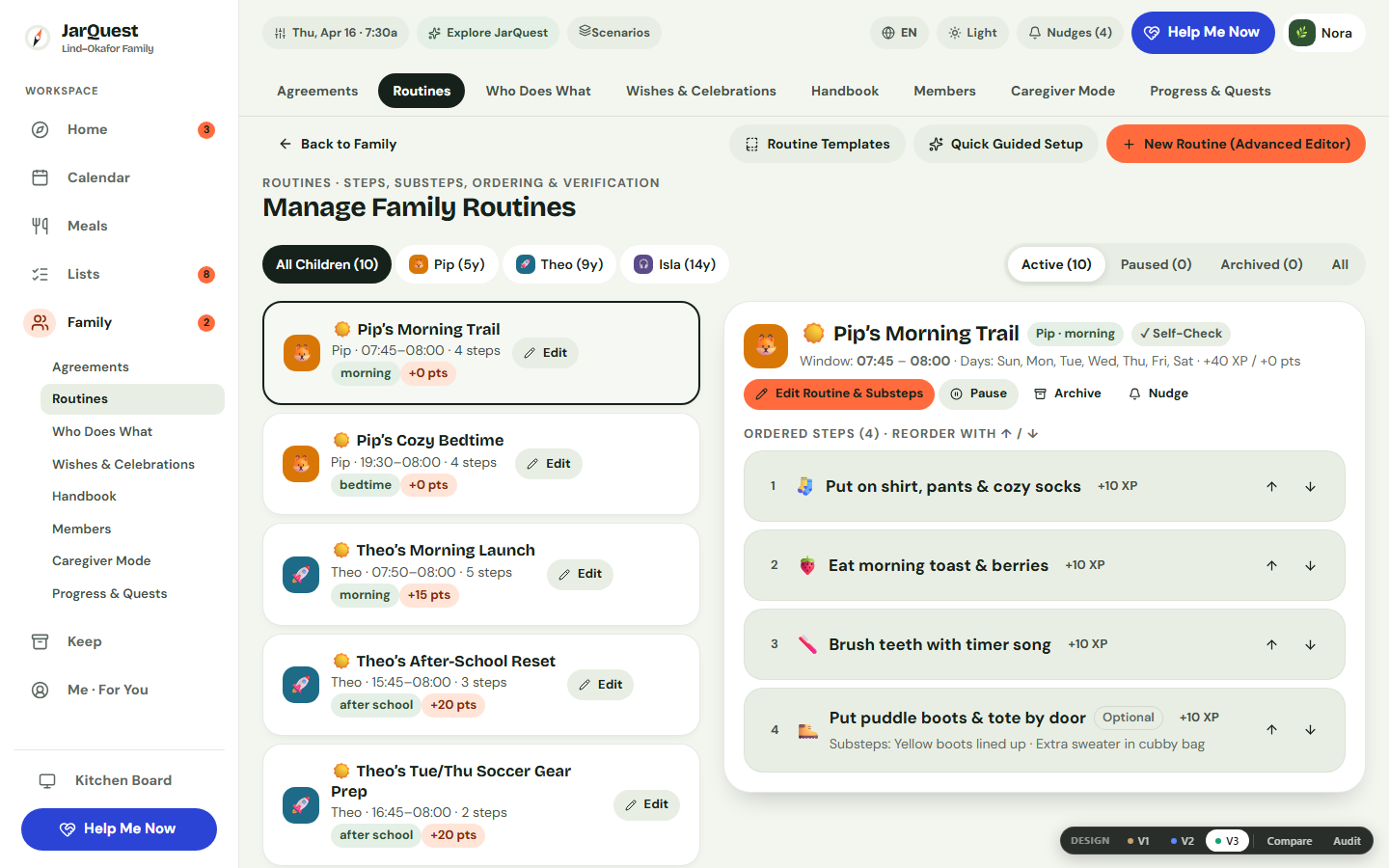
Step 1: Configure Morning Steps and Nested Backpack Substeps
Open Family → Routines and select your child’s Morning Launch routine. Set the weekday schedule (Mon–Fri), time window (07:15 – 07:55), Adult Helper, and checkable substeps under the backpack step.
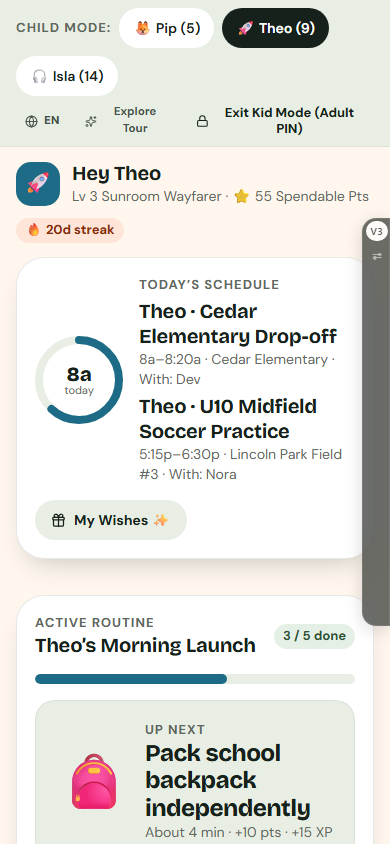
Step 2: Hand the Shared Device to Your Child in Kid Mode
Switch to Kid Mode. Pip sees pre-reader picture icons with read-aloud audio; Theo sees his current step card, nested substeps, and a wave-for-help button.
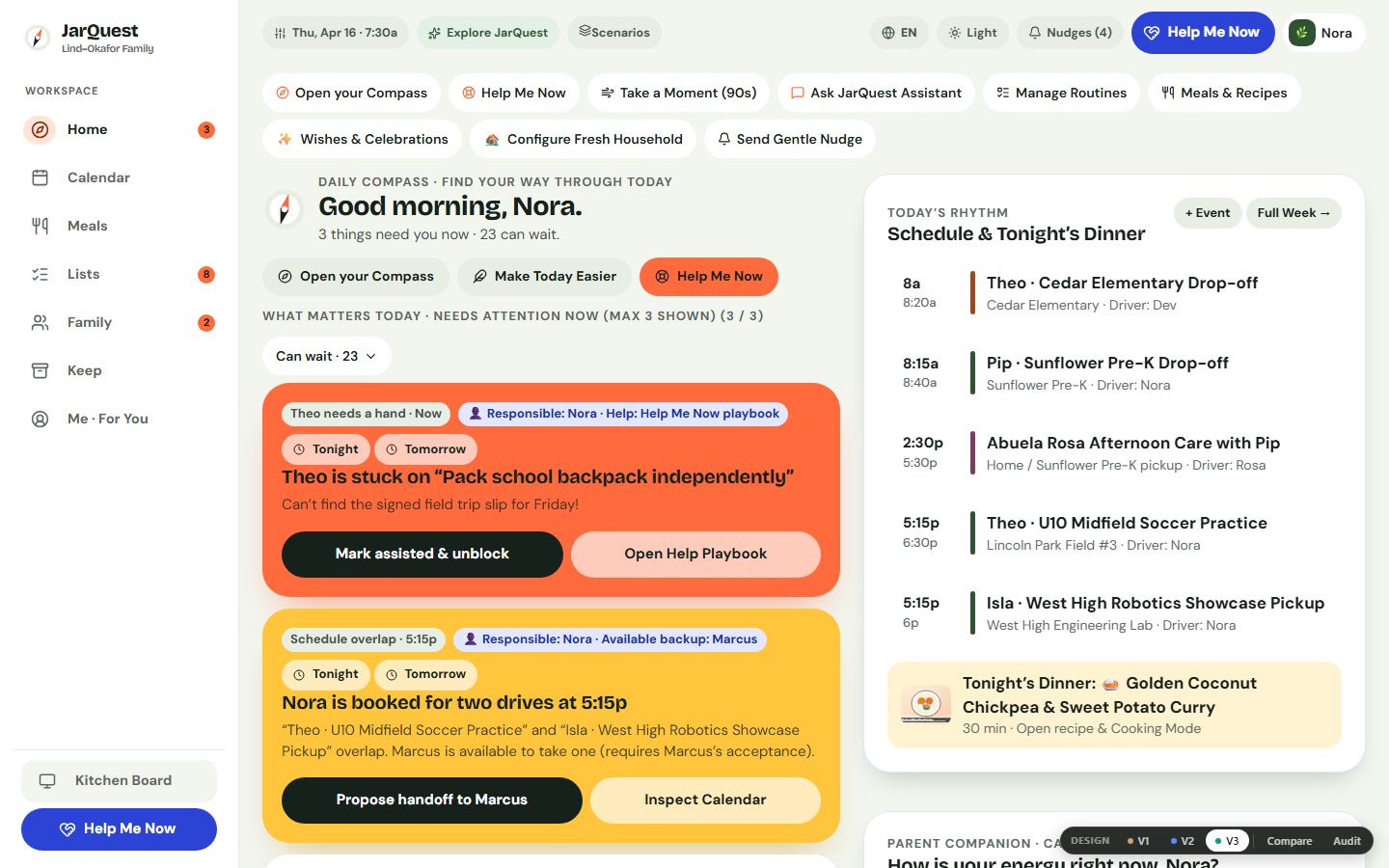
Step 3: Monitor Progress on Daily Compass or Open "Help Me Now"
On Daily Compass, the What matters right now deck is capped at three priority cards. If a child refuses a step, tap Help Me Now for a calm What to do now → What to say → What to do next script and 1-tap routine trimming.
Honest Limitations & Planned Features
- What JarQuest reduces: Verbal nagging, forgotten backpack items, and ambiguity over which adult is backing up the morning launch.
- What JarQuest cannot guarantee: No checklist replaces adequate sleep, nutrition, or realistic departure buffers.
- Prototype vs. Production Status: Multi-step routines, nested substeps, age-adapted Kid Mode, and Help Me Now routine simplification are verified in the interactive V3.4.1 prototype. Multi-device cloud sync and server-enforced authentication are part of the upcoming production cloud release.
Frequently Asked Questions
How many steps belong on a child’s morning routine chart?
Keep weekday mornings between 3 and 5 steps, grouping small items as 2–3 sub-checks inside a single "Pack Backpack" step.
Should we pay allowance or points for basic morning hygiene?
Treat getting dressed and brushing teeth as unpaid family baselines. In JarQuest, you can switch Gamification Mode to Gentle or Off anytime.
What if siblings share one parent phone in the morning?
In the interactive prototype, parents can hand one device to a child in Kid Mode, let siblings switch between their child-safe tabs, and require the 4-digit Adult PIN to return to the parent workspace. In production, this UI boundary is paired with server-authenticated role sessions.
Related Guides & Contextual Next Step
- Related Guide 1: What to Do When Chore Charts Stop Working
- Related Guide 2: Bedtime Resistance Without Nightly Negotiations
- Related Guide 3: Kids Backpack & School Supplies Checklist
- Free Printable Utility: Open the No-Login Printable Morning Routine Generator
- Explore the Feature: See Visual Routines & Family Handbooks in JarQuest