Who Does What: A Family Responsibilities Chart for Parents & Kids (Without Scorekeeping)
Make household ownership visible across adults and kids without competitive scoreboards. Use this Primary + Backup Owner chart and consent handoff guide.
Short Answer
Most household chore charts fail because they only list children’s bedroom chores (Make bed, pick up toys) while leaving 85% of the real daily work—morning drop-offs, dinner prep, school forms, pet care, trash night, and laundry—floating in unspoken adult assumptions. Conversely, apps that try to gamify adult chores with points and leaderboards quickly turn partners into resentful competitors keeping score.
Build a calm, durable Whole-Family "Who Does What" Chart using four principles:
- Assign Every Recurring Domain a Single Primary Owner AND a Named Backup Owner. "We both do it" usually means nobody owns noticing when it needs to be done.
- Include Both Adult Logistics and Age-Calibrated Kid Zones on One Shared Map so children see that everyone in the household contributes to keeping the home running.
- Define the Time Window and "Done Standard" in One Line (e.g., Kitchen Evening Reset: 7:00 PM — Dishwasher started, counters wiped, tomorrow's coffee set).
- Use a "Consent Handoff" Rule (
Pending → Accepted) When Life Happens. If the Primary Owner is stuck in traffic or exhausted, they explicitly ask the Backup Owner to take tonight’s pass rather than assuming someone else noticed.
Why Families Encounter This Problem
In discussions on r/ParentingTech and r/daddit, parents explain why both traditional sticker charts and corporate task managers fall short at home:
- Invisible Adult Domains: Kids rarely see the work that goes into grocery planning, signing school forms, or packing sports gear. When parents put adult responsibilities on the same visible board as kid responsibilities, children understand that household care is a shared team effort, not an arbitrary punishment.
- No Backup Plan for Busy Nights: A chart that says "Dev cooks Tuesday dinner" breaks the first Tuesday Dev has a late client call—unless Nora is listed as Backup Owner with an agreed 15-minute backup meal.
- Toxic Scorekeeping: Counting who earned more points between two exhausted parents misses the whole point of partnership. What families actually need is coverage clarity: knowing that every essential domain is covered today.
Realistic Household Example
Household: Two working parents (Nora and Dev), three children (Pip, 4; Theo, 8; Isla, 14), and connected Co-Parent Marcus (scoped to Theo).
- How the household structures "Who Does What":
- Nora (Primary) / Dev (Backup): Mon/Wed/Fri Morning Launch, Weekly Meal Plan & Grocery Sync, Preschool Tote & Extra Clothes.
- Dev (Primary) / Nora (Backup): Tue/Thu Morning Drop-Off, School Forms & Friday Folder, Trash & Recycling Night.
- Isla (Age 14, Primary) / Dev (Backup): Thursday Personal Laundry, Dining Table Clear (Bundle A/B Swap).
- Theo (Age 8, Primary) / Nora (Backup): Evening Pet Water & Food Bowl, Entryway Shoe Rack Reset.
- Pip (Age 4, Helper with Adult): Napkins on Dining Table, Living Room Toy Bin Toss.
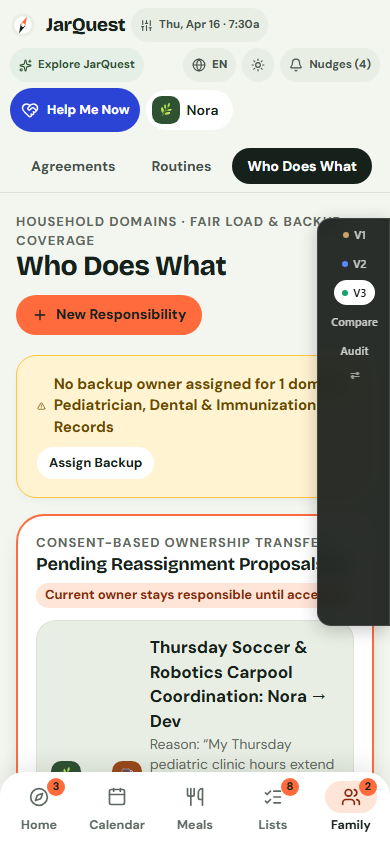
- When Dev has an unexpected late Tuesday meeting, he opens Family → Who Does What, selects Tue/Thu Morning Drop-Off / Afternoon Pickup, and taps Propose Handoff to Nora. Until Nora taps Accept, the responsibility visibly shows Pending Handoff so nothing is dropped silently.
Practical Step-by-Step Solution Requiring No App
Create your household's Who Does What Charter in 20 minutes this Sunday:
- Group household work into 8 to 10 Recurring Loops (not 60 micro-tasks):
- Loop 1: Morning Launch & School Drop-Off
- Loop 2: Afternoon Pickups & Activity Gear
- Loop 3: Weeknight Dinner & Lunchbox Packing
- Loop 4: After-Dinner Table, Dishes & Counter Reset
- Loop 5: Pet Care (Water, Food, Walks)
- Loop 6: Trash, Recycling & Entryway Shoes
- Loop 7: Laundry & Towels
- Loop 8: School Forms, Library Books & Weekend Groceries
- Assign ONE Primary Owner and ONE Backup Owner to each loop. For children’s loops (like Pet Water or Table Clearing), a child is the Primary Owner and an adult is always the Backup Owner (never an older sibling policing a younger sibling).
- Write a 1-Sentence "What Done Looks Like" Note next to each loop so everyone agrees on the standard.
- Post the chart in a neutral shared spot (like the inside of a pantry door or on a calm Kitchen Wallboard) where anyone can check "Whose turn is table reset tonight?" without asking a parent.
- Use the "Verbal or Tap Handshake" for Swaps: You own your primary loop until your Backup Owner explicitly says "Got it, I'm covering dinner/pickup tonight."
Printable / Copyable Template
Copy this Whole-Family "Who Does What" Matrix or print a customized sheet in our Free No-Login Printable Routine & Caregiver Generator:
WHO DOES WHAT — WHOLE-FAMILY RESPONSIBILITY CHART
Rule: Primary Owner holds the loop until Backup confirms a handoff!

DOMAIN / RECURRING LOOP          | WINDOW    | PRIMARY OWNER | BACKUP OWNER
---------------------------------+-----------+---------------+--------------
1. Morning Launch & Drop-Off     | 7:15 AM   | _____________ | _____________
2. Afternoon Pickup & Gear       | 3:15 PM   | _____________ | _____________
3. Dinner Cook & Lunchbox Pack   | 5:30 PM   | _____________ | _____________
4. Table Clear & Crumb Sweep     | 6:30 PM   | _____________ | _____________
5. Dishwasher & Counter Reset    | 7:00 PM   | _____________ | _____________
6. Pet Water, Food & Walk        | AM / PM   | _____________ | _____________
7. Entryway Shoes & Recycling    | Evening   | _____________ | _____________
8. School Folders & Forms Check  | Fri / Sun | _____________ | _____________
Common Mistakes & What to Do When the Initial Approach Fails
- Mistake 1: Listing two people as "50/50 Primary Owners" on the same day. Writing "Nora & Dev" in the Primary column recreates the exact ambiguity you are trying to solve. Either alternate days explicitly (Mon/Wed/Fri vs. Tue/Thu) or name one Primary and one Backup.
- Mistake 2: Using the chart to keep score during an argument. A responsibility chart is a windshield for looking at what needs coverage today, not a rearview mirror for litigating last month.
- Mistake 3: Putting private adult reminders on a public kitchen board. Keep sensitive adult check-ins, medical notes, and gift budgets off the shared kitchen display.
- When NOT to use this approach: When a household member is sick, traveling, or caring for a newborn, temporarily reassign their primary loops to backup mode and drop non-essential tasks via a Minimum Viable Day reset.
How JarQuest Can Help
JarQuest’s Who Does What workspace and Kitchen Wallboard turn household ownership into a calm, living system:
- 2-Pane "Who Does What" Matrix: Lists every recurring family responsibility on the left and displays its Primary Owner, Backup Owner, schedule window, and preparation steps on the right.
- Explicit Consent Handoffs (
Pending → Accepted): Lets any owner propose a handoff when their schedule shifts, keeping the original owner accountable until the backup accepts. - Privacy-Safe Kitchen Wallboard: Displays today’s shared family schedule, meals, and responsibilities on a counter tablet while strictly excluding private adult mood check-ins and secret birthday gift plans.
Step-by-Step JarQuest Setup (Interactive Prototype Walkthrough)
Product Status Note: All screenshots below are captured from the functioning JarQuest Sunroom V3.4.1 interactive prototype.
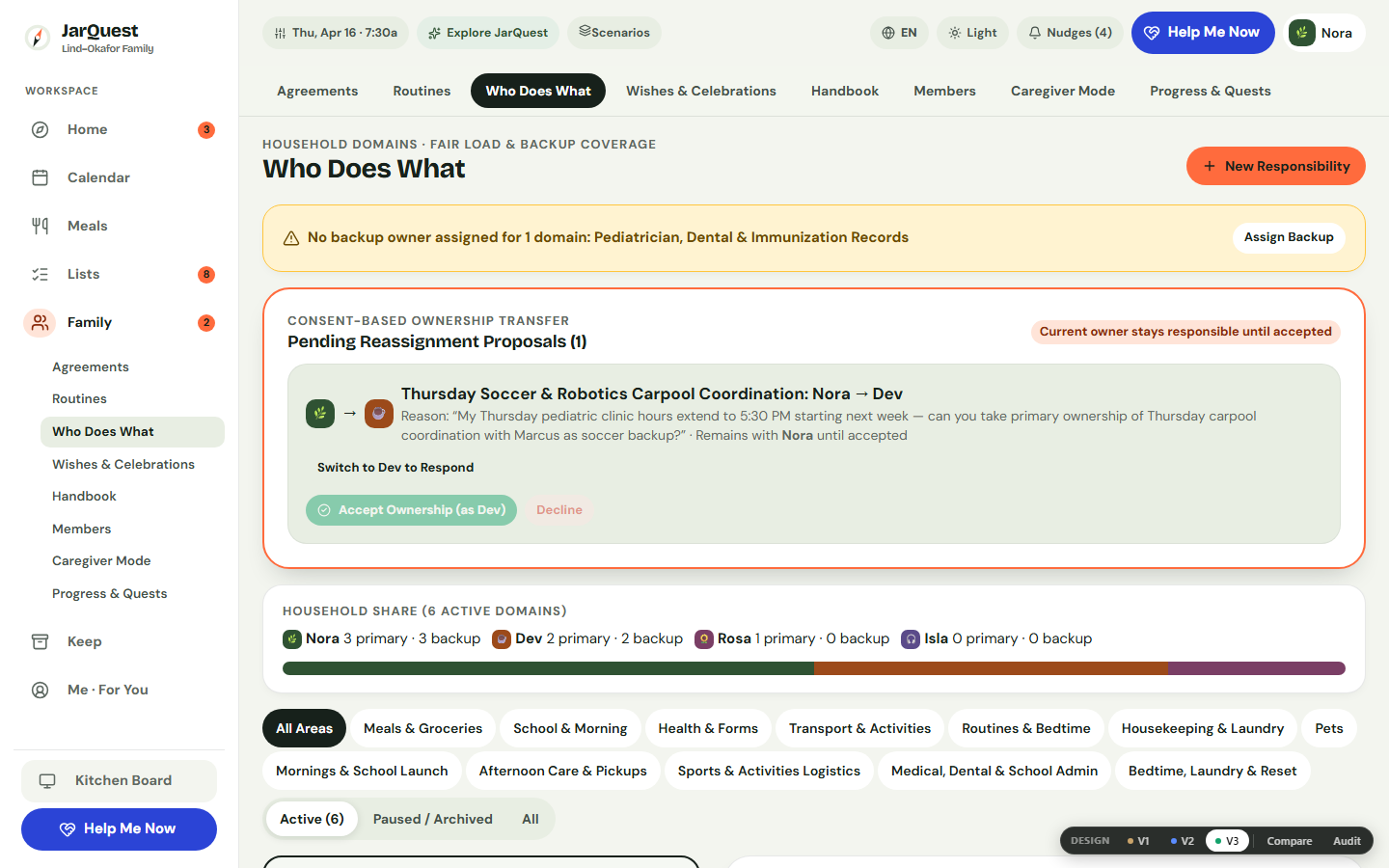
Step 1: Review Primary & Backup Owners in Family → Who Does What
Open Family → Who Does What. Filter by family member or category to see every recurring responsibility, its Primary Owner, its Backup Owner, and what "Done" includes.
Step 2: Propose and Accept a Coverage Handoff on Mobile
On a phone (390px), open Who Does What to propose a coverage swap when a meeting runs late—visibly tracking the Pending Handoff state until accepted.
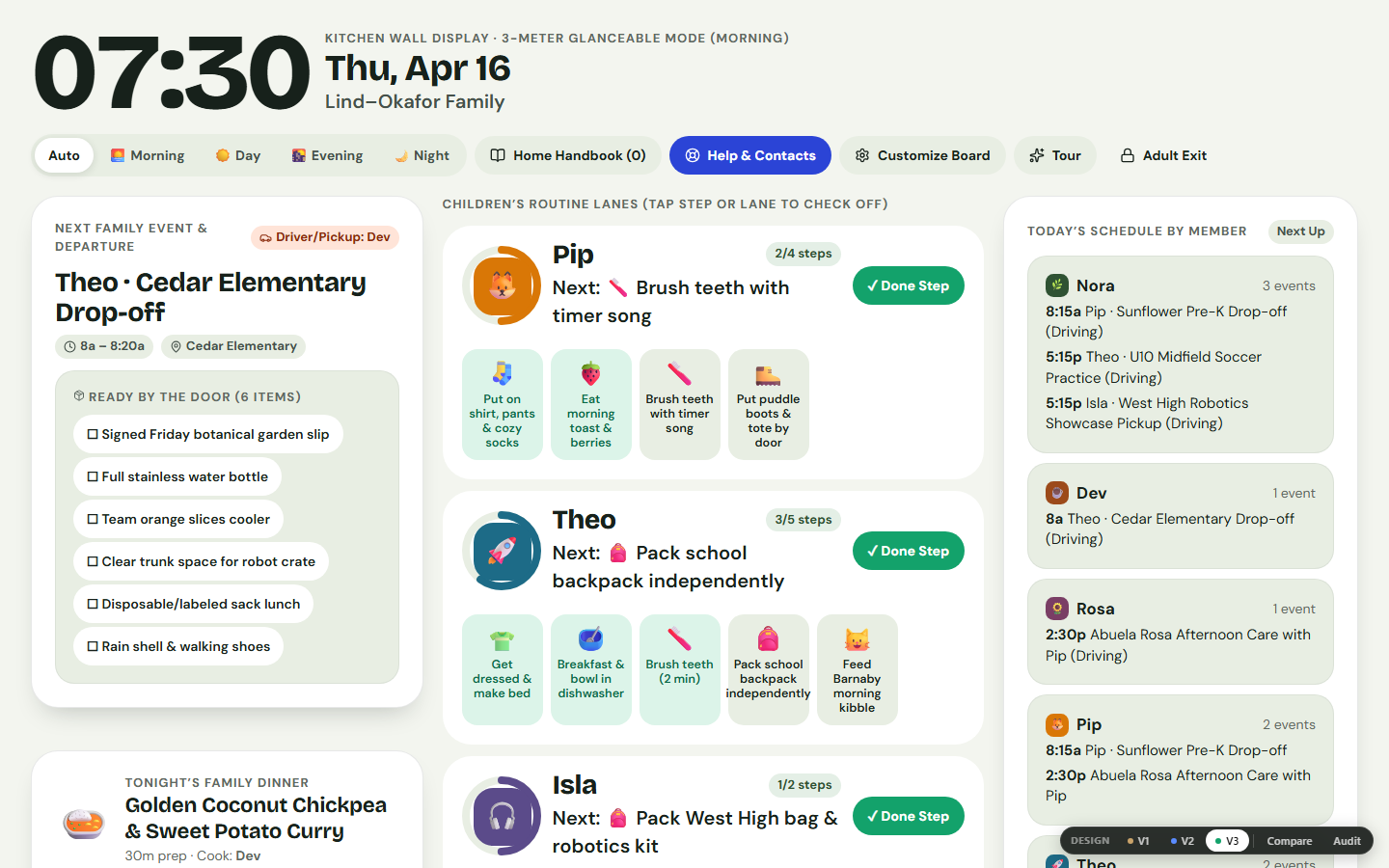
Step 3: Display Today's Shared Plan on the Kitchen Wallboard
Open Kitchen Board on a shared tablet or desktop (1440px) to show today’s schedule, dinner plan, and shared responsibilities—with zero private parent journals or gift spoilers exposed.
Honest Limitations & Planned Features
- What JarQuest reduces: "I thought you were doing it" misunderstandings, invisible mental-load accumulation, and sibling arguments over who owns shared zones.
- What JarQuest cannot guarantee: Software cannot make an overloaded week shorter—pairing ownership clarity with Make Today Easier on hard days is essential.
- Prototype vs. Production Status: Primary/backup responsibility CRUD, consent handoffs (
Pending → Accepted), Respectful Nudges, and the privacy-safe Kitchen Wallboard are verified in the V3.4.1 prototype. Automated weekly sibling A/B chore bundle rotation is a planned roadmap feature, and multi-device cloud sync is part of the upcoming production cloud release.
Frequently Asked Questions
How is "Who Does What" different from a regular to-do list?
A to-do list tracks one-off errands ("Buy lightbulbs"). Who Does What maps ongoing recurring ownership loops ("Weekday Morning Drop-Off" or "Evening Pet Care") with a standing Primary Owner and Backup Owner so you don't have to re-delegate the same job every day.
Should toddlers and preschoolers be on the family responsibilities chart?
Yes—in a Helper Role paired with an adult (such as putting napkins on the table or tossing blocks into a bin). Seeing their name on the family map builds pride and belonging early on.
Are secret birthday gift plans or parent mood check-ins ever shown on the Kitchen Wallboard?
In the V3.4.1 interactive prototype, Kitchen Wallboard is explicitly scoped to shared schedule, meal, and routine summaries—excluding adult gift coordination and private mood/energy check-ins. In production, this boundary is enforced via server-side view permissions.
Related Guides & Contextual Next Step
- Related Guide 1: How to Share the Family Mental Load: A Recurring-Responsibility Playbook
- Related Guide 2: Fair Chore Division for Siblings: How to Rotate Tasks Without Arguments
- Related Guide 3: What to Do When Chore Charts Stop Working After Two Weeks
- Free Printable Utility: Print a Shared Family Responsibility Sheet
- Explore the Feature: See Who Does What & Family Agreements in JarQuest