Weekly Meal Planning for Overwhelmed Parents: The 5-Dinner Rhythm
End the 5:15 PM 'what's for dinner?' scramble. Use this 5-meal repeatable family template, rescue pantry backup, and 1-tap grocery sync workflow.
Short Answer
The hardest part of family dinner is rarely cooking—it is making a multi-person inventory and preference decision at 5:15 PM when everyone is already hungry and tired. Many meal-planning systems fail busy parents because they try to plan 21 unique gourmet meals a week, which turns Sunday afternoon into an exhausting research project.
To make weeknight dinners calm and repeatable without any app, switch to the 5-1-1 Family Dinner Rhythm:
- Plan only 5 weeknight dinners—never 7. Leave one night as an explicit Leftovers / Buffet Night and one night as Pantry Rescue / Takeout.
- Anchor each weeknight to a repeatable theme (Monday Pasta/Grain, Tuesday Tacos/Wraps, Wednesday Sheet-Pan/Soup, Thursday Breakfast-for-Dinner or Stir-Fry, Friday Pizza/Picnic) so you only choose between two familiar recipes per slot.
- Keep one "15-Minute Emergency Swap" stocked in the freezer/pantry (black bean quesadillas, tortellini + jarred sauce + frozen peas, or eggs + toast + fruit) for nights when a meeting runs late.
- Build your grocery list directly from those 5 dinners plus a fixed 10-item staple list, grouped by store aisle so you only shop once.
- *Give kids a bounded vote on one night ("Tacos or quesadillas on Tuesday?"*) before you shop, not at 5:45 PM when the pan is already hot.
Why Families Encounter This Problem
When parents plan meals from scratch every week, they hit three predictable bottlenecks:
- The "Seven-Recipe Overreach": Buying fresh ingredients for seven elaborate dinners often leads to wasted produce because at least one evening is disrupted by late soccer practice or fatigue.
- Disconnected Recipes and Shopping Lists: When the meal plan and shopping list live in separate places, parents still make three stressful 6:00 PM store runs a week.
- Last-Minute Kid Vetoes: Asking a tired 5-year-old at 5:30 PM "What do you want for dinner?" invites arguments. Offering a bounded choice before the week starts gives kids agency without derailing the cook.
Realistic Household Example
Household: Two working parents (Nora and Dev) and three children (ages 4, 8, and 14) with Tuesday/Thursday evening sports practices.
- How the household runs the 5-1-1 Rhythm:
- Monday (25 min, Nora cooks): Lemon-herb chicken & rice skillet (leftover rice saved for Thursday).
- Tuesday — Practice Night (15 min, Dev cooks): Crispy black bean & cheese quesadillas with avocado slices (Pip’s picture-mode request).
- Wednesday (30 min, Nora cooks): Red lentil & sweet potato curry (batch-friendly).
- Thursday — Practice Night (20 min, Dev cooks): 15-minute veggie fried rice using Monday’s extra rice + frozen peas + eggs.
- Friday (Fun Anchor): Homemade flatbread pizza night + movie.
- Saturday: Leftover smorgasbord / clear-the-fridge night.
- Sunday: Flexible family meal + 10-minute grocery sync for Monday–Friday.
- When Thursday turns hectic after a late pickup, Nora taps Make Today Easier on Daily Compass to swap dinner to the 15-minute quesadilla backup with one tap—and can Undo the swap if plans clear up.
Practical Step-by-Step Solution Requiring No App
- Write down your household’s "Core 10" dinners: five 25-Minute Meals for normal nights and five 15-Minute Rescue Meals for practice or low-energy nights.
- Match prep time to your calendar BEFORE choosing recipes. If Wednesday has a 5:00 PM appointment, only a 15-minute or leftover meal goes in Wednesday’s slot.
- Do a 60-second Fridge & Pantry Cross-Out so you only buy missing ingredients.
- Group grocery items into 5 store zones (Produce, Dairy & Eggs, Pantry, Protein, Frozen) to cut shopping time in half.
- Post the 5 dinners where kids can see them and assign one simple prep job (setting napkins or washing berries).
Printable / Copyable Template
Copy this 5-1-1 Weekly Meal & Grocery Strip or print a kitchen sheet in our Free No-Login Printable Routine & Caregiver Generator:
THE 5-1-1 WEEKLY DINNER PLAN (Match Prep Time to Today's Schedule!)

Mon (Normal):   __________________________ | Cook: ______ | Prep: ___m
Tue (Busy/Fast):__________________________ | Cook: ______ | Prep: ___m
Wed (Normal):   __________________________ | Cook: ______ | Prep: ___m
Thu (Busy/Fast):__________________________ | Cook: ______ | Prep: ___m
Fri (Easy/Fun): __________________________ | Cook: ______ | Prep: ___m
Sat: Leftovers Buffet Night    Sun: Pantry Rescue / Flexible Night
Common Mistakes & What to Do When the Initial Approach Fails
- Mistake 1: Cooking separate meals every night for picky eaters. Use the "Deconstructed Family Meal" rule instead: serve tacos, pasta, or bowls with toppings separate, and include one "safe food" (rice, bread, fruit, or cheese) everyone eats.
- Mistake 2: Putting a brand-new recipe on a busy Tuesday. Save new recipes for relaxed weekends.
- Mistake 3: Auto-replacing dinner without asking. Always preview and confirm dinner swaps so thawed ingredients aren't wasted.
- When NOT to use this approach: For strict medical diets or severe food allergies, always verify ingredient labels directly rather than relying on generic templates.
How JarQuest Can Help
JarQuest connects Meals, Grocery Lists, Kid Meal Requests, and Daily Compass into one calm workflow:
- 14-Day Multi-Slot Meal Planner: Assigns breakfasts, lunches, and dinners with prep times, dietary tags, and cook ownership.
- One-Tap Recipe-to-Grocery Sync: Pushes missing ingredients from your planned meals directly into your aisle-grouped Lists workspace.
- High-Contrast Dark Shop Mode: Switches your grocery list into a high-contrast, one-handed store view on your phone.
- Safe "Make Today Easier" Dinner Swap: Previews a swap to your fastest available recipe on hard days—never overwriting your meal plan without confirmation, and always offering a 1-tap Undo.
Step-by-Step JarQuest Setup (Interactive Prototype Walkthrough)
Product Status Note: The screenshots below are captured from the functioning JarQuest Sunroom V3.4.1 interactive prototype.
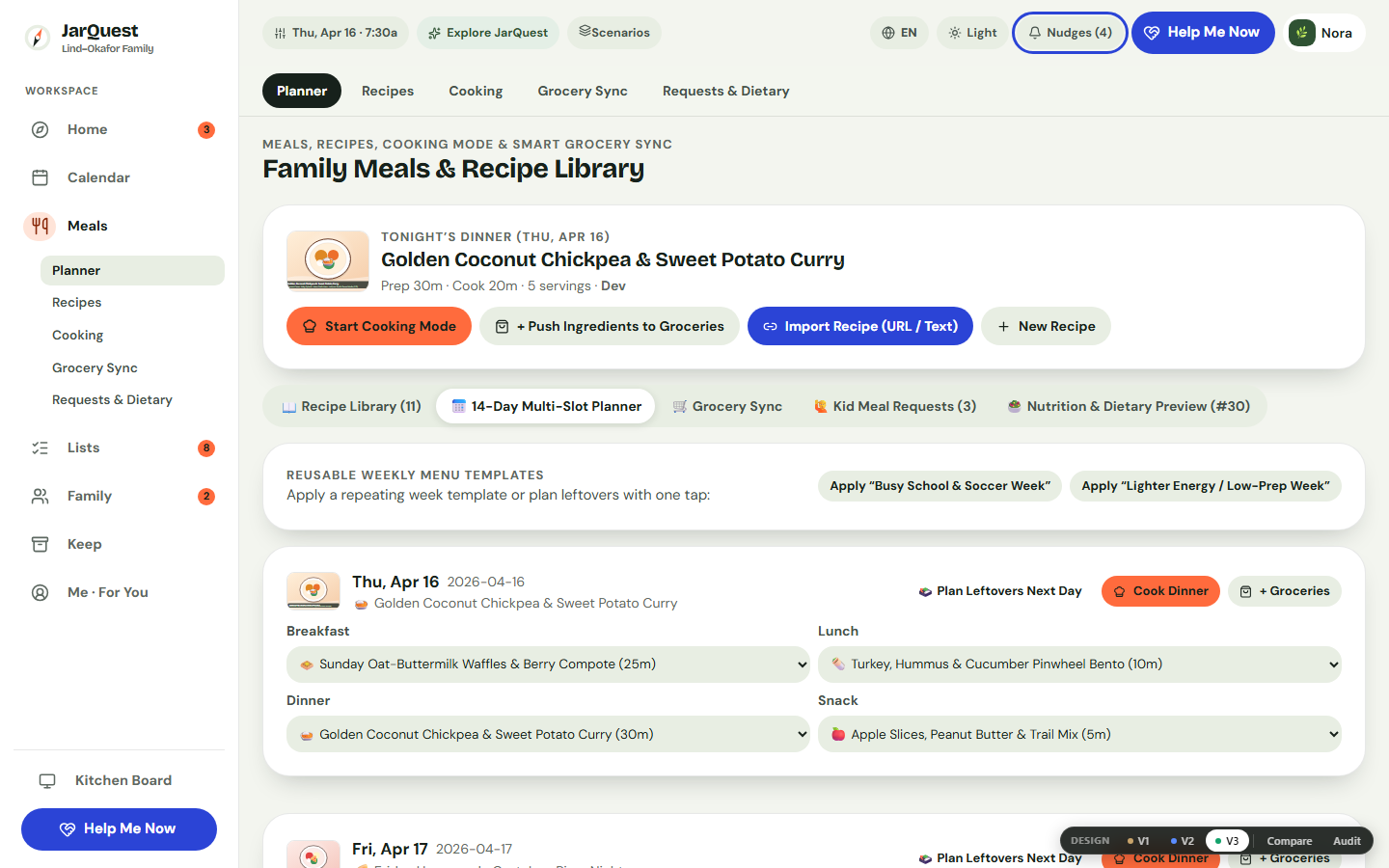
Step 1: Assign Repeatable Dinners in the 14-Day Meal Planner
Open Meals → Planner. Review the week ahead alongside prep times (15 min, 25 min, 30 min) and assign recipes to each day—or approve a child’s bounded meal request submitted from Kid Mode.
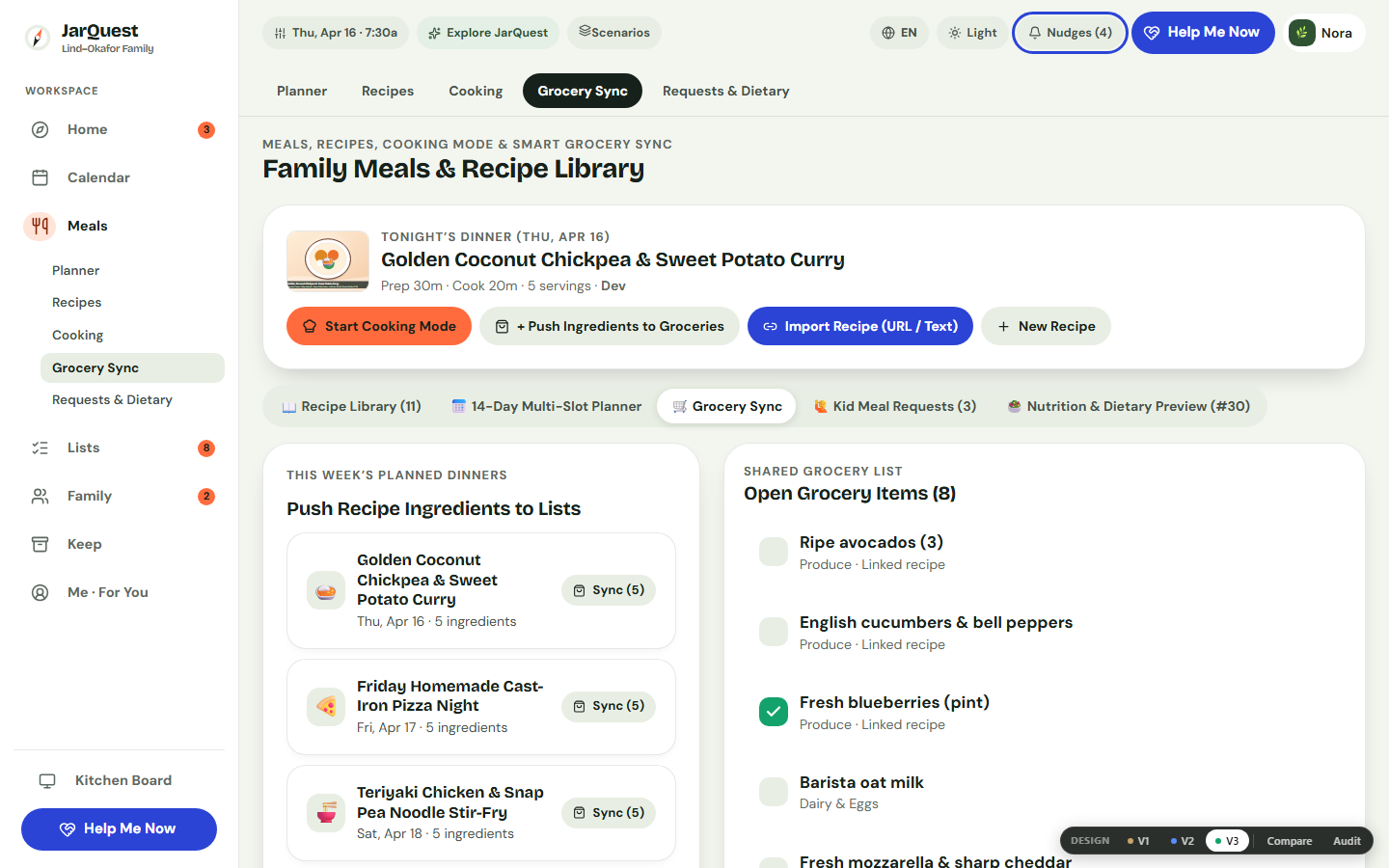
Step 2: Sync Missing Ingredients to Your Grocery List
Switch to Meals → Grocery Sync. Review the ingredients needed for your planned meals and push missing items directly into your shared shopping list without typing them twice.
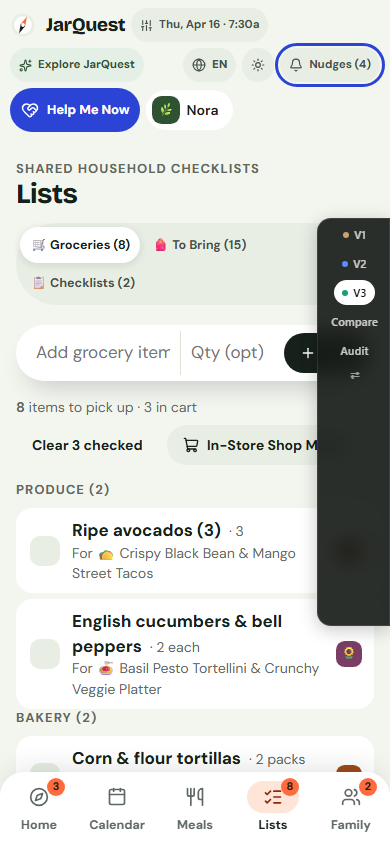
Step 3: Check Off Groceries One-Handed on Mobile
In the store, open Lists on your phone (390px). Items are grouped by aisle (Produce, Dairy, Bakery, Pantry) and support Dark Shop Mode for fast, glare-free checkoff.
Honest Limitations & Planned Features
- What JarQuest reduces: 5:15 PM decision paralysis, duplicate typing between meal plans and shopping lists, and forgotten ingredients.
- What JarQuest cannot guarantee: A planner cannot chop vegetables for you or guarantee a 4-year-old will eat broccoli tonight.
- Prototype vs. Production Status: The 14-day Meal Planner, Kid Meal Requests, Grocery Sync, Dark Shop Mode, and Make Today Easier dinner swaps with 1-tap Undo are verified in the V3.4.1 prototype. Live grocery delivery cart integration and automated receipt scanning are not part of the current product scope.
Frequently Asked Questions
How do I get my kids to stop complaining about what is for dinner?
Give each child one bounded meal request per week ("Pick one dinner from our family recipe list for Tuesday or Thursday"). In JarQuest’s Kid Mode, even a 4-year-old can tap a picture icon in Yums to send a polite meal request to Mom and Dad.
What if I plan 5 meals on Sunday and our schedule blows up on Wednesday?
Treat your weekly meal plan as a menu of 5 stocked options, not a rigid schedule. If Wednesday runs late, swap Wednesday’s 30-minute meal with Tuesday’s 15-minute quesadillas—or tap Make Today Easier on Daily Compass to switch to your fastest rescue recipe and save the other ingredients for tomorrow.
Should I plan lunches and breakfasts too?
Only if it helps you. Most busy parents get the biggest relief by keeping breakfasts on a fixed 2-option rotation (oatmeal/eggs or yogurt/toast) and planning only 5 weeknight dinners.
Related Guides & Contextual Next Step
- Related Guide 1: Picky Eater Family Meal Planning: Bounded Kid Choices Without Cooking Twice
- Related Guide 2: How to Organize Family Recipes From Websites, Screenshots & Cookbooks
- Related Guide 3: When You’re an Overwhelmed Parent: How to Make Today Easier
- Free Printable Utility: Print a Weekly Household Checklist
- Explore the Feature: See the 14-Day Meal Planner & Grocery Sync in JarQuest